Running a website in just one language? You’re missing out on 75% of internet users who don’t speak English. If you want to reach people in France, Germany, Spain, Japan, or anywhere else in the world, then your WordPress site needs to speak their language.
Solution: multilingual plugins, and when it comes to multilingual plugins, Polylang, WPML, TranslatePress, and Weglot are among the most widely used solutions. In this article, we’ll compare and discuss Polylang and WPML, and determine which one is better or if there’s an even better option waiting for you.
What is Polylang?
Polylang is a popular WordPress multilingual plugin that allows website owners to create and manage content in multiple languages without creating separate websites. It enables you to add unlimited languages to your WordPress site and translate posts, pages, categories, tags, menus, and URLs so visitors can view content in their preferred language.
What is WPML?
WPML (WordPress Multilingual Plugin) is a premium WordPress plugin that helps you build and manage multilingual websites from a single WordPress installation. It allows you to translate pages, posts, custom post types, taxonomies, menus, theme strings, and plugin text into multiple languages while keeping everything centrally managed. WPML supports both manual translation and automatic translation using integrated translation services.
Key Features
- Multilingual Website: WordPress only handles one language. There is no built-in option to show different content to visitors from different countries. Both Polylang and WPML fix this by letting you create and manage content in multiple languages on the same website.
- Multiple Language Support: Both Polylang and WPML allow you to add unlimited languages to your WordPress site, helping you reach audiences across different regions.
- Manage Translations: Instead of running separate WordPress sites for each language, both plugins keep everything in a single dashboard. You update themes, plugins, and content once, and manage all translations from the same place.
- SEO-Friendly: Search engines need to understand which language each page is written in. Polylang and WPML handle this automatically by adding language-specific URLs and hreflang tags, helping Google index your content correctly.
Limitations
While both plugins are powerful, there are some limitations that become more noticeable as your site grows.
- Manual Translation: With both Polylang and WPML, you need to translate content manually.
Imagine writing a 2,000-word blog post and then rewriting it again in other languages. Publishing a page in multiple languages is just the beginning. When you update pricing, features, or content in the original language, every translated version needs the same update. It’s harder to track changes as your website grows and content updates become more frequent. The process is not only time-consuming but also mentally exhausting. - Automatic Translation: Automatic translation is not available by default in both plugins. WPML requires you to purchase paid translation credits to translate content automatically, which increases ongoing costs as your site grows, while for Polylang, you need to install another plugin: Lingotek Translation, which doesn’t have good reviews from users.
- Language Switcher & Elementor Translation: Polylang does not support Elementor page translation and the option to add a language switcher. To add a language switcher and Elementor templates translation, you need an extra plugin: Polylang Connect for Elementor. Requiring extra setup, another dependency to manage, and compatibility issues over time.
- Complex Setup: WPML comes with many advanced features, which are great for large or professional websites. However, it has a complex setup and slows down your website’s speed. There are many settings and options to configure before your site works properly.
Better Alternative: Linguator AI – Auto Translate & Create Multilingual Sites
Linguator, a free and powerful multilingual plugin that helps you create and manage multilingual content on your WordPress website. Easily translate your posts, pages, menus, and categories into different languages using AI and connect with visitors worldwide.
- AI-Powered Automatic Translation: With Linguator, you don’t need to manually rewrite content in each language. It uses built-in AI translation engines (such as Google Translate or browser-based AI) to automatically translate your posts and pages in one click, however manual translation is also supported.
- Unlimited Languages: There are no limits to how many languages you can add. All languages are managed from a single dashboard, making it easy to organize and update content in multiple languages.
- Elementor & Gutenberg Compatibility: Linguator fully supports popular page builders like Elementor and Gutenberg, letting you translate complex layouts, widgets, and blocks without breaking design or requiring extra plugins.
- Bulk & Inline Translation: Translate multiple posts, pages, or custom content at once using the bulk translation feature, saving significant time. For more control, you can translate specific blocks or widgets right inside the editor.
- Custom Post Types & Taxonomies: Whether it’s portfolios, products, events, or testimonials, Linguator can automatically translate custom post types and taxonomies in bulk.
- Menus, Media & SEO-Friendly URLs: You can create separate navigation menus for each language, translate media metadata like alt text and captions, and generate SEO-friendly language-specific URLs to improve your site’s global search performance.
- Language Switcher & Browser Detection: Linguator includes flexible language switcher options (classic, block, or Elementor widget) and can detect a visitor’s preferred language based on browser settings.
- RTL Language Support: Right-to-left languages like Arabic and Hebrew are fully supported, with automatic text direction and layout adjustments ensuring proper display.
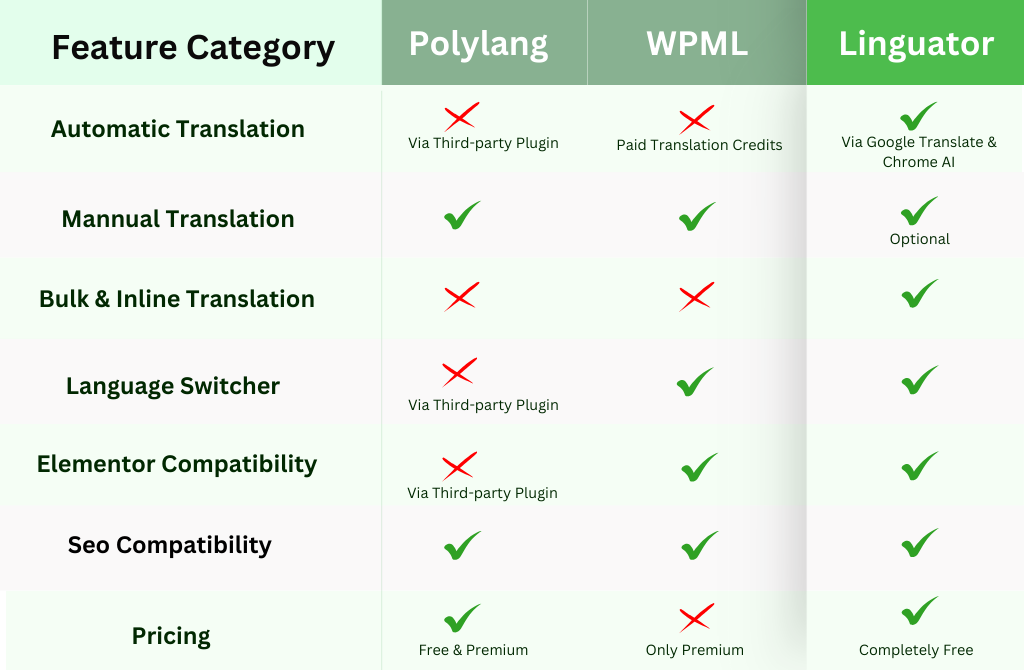
Both Polylang and WPML are popular choices for creating multilingual WordPress websites. They help you translate and manage multiple languages. However, they come with challenges, like manual translation takes too much time, automatic translation costs extra money, and a complicated setup.
So, if you want all-in-one, simpler, and faster solution, then Linguator is worth trying.